
Follow up with inactive customers
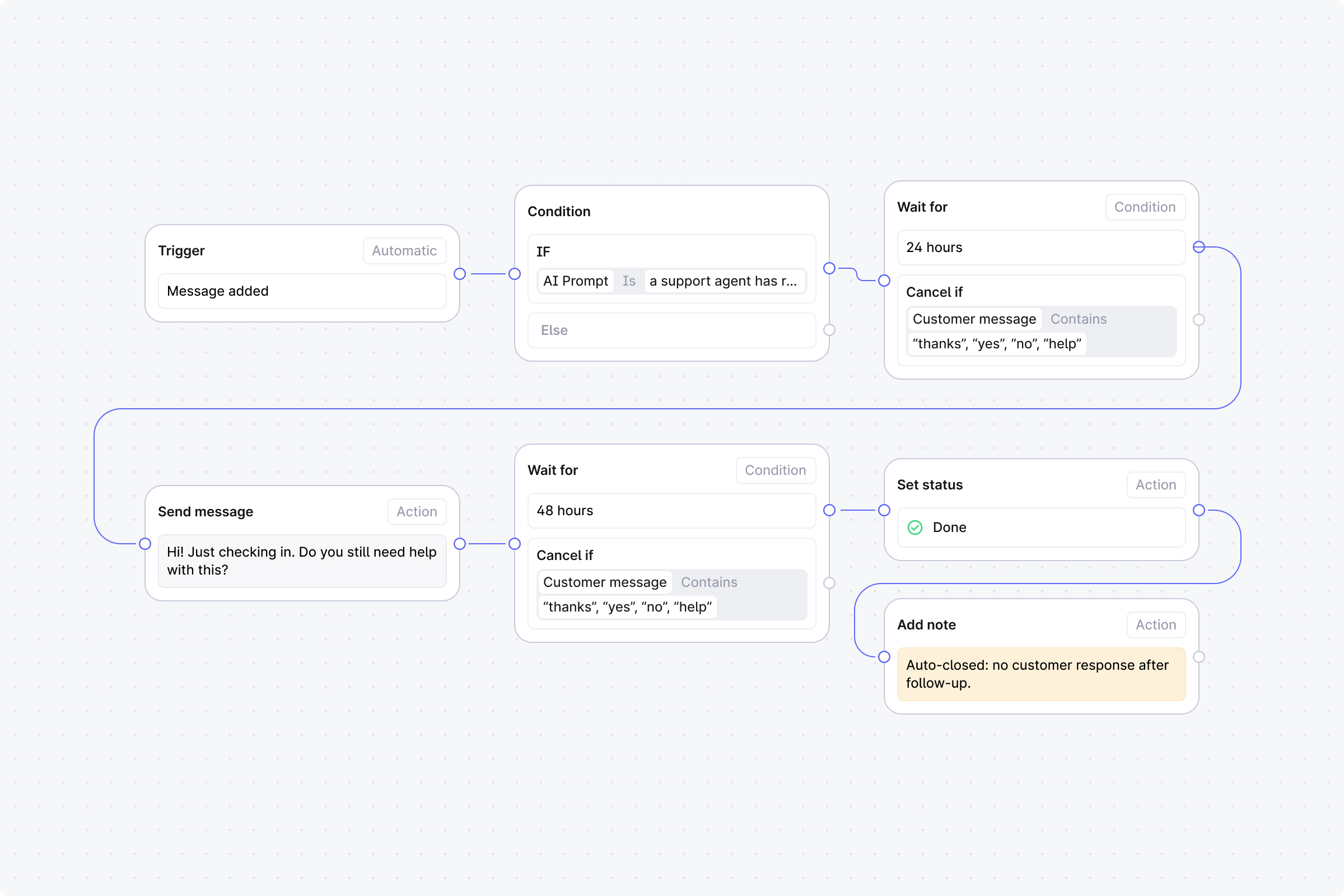
After your team replies, wait 24 hours. If the customer hasn't responded, send a follow-up. If still no response after 48 more hours, close the thread.
Setup
Trigger: Set to Automatic, event: Message added.
Step 1 (Condition): Use an AI prompt match with: "a support agent has replied to the customer". Or use Any user message contains with keywords.
No: End the workflow.
Yes: Continue.
Step 2 (Wait): Duration: 24 hours. Cancel condition: Any customer message contains common reply words (e.g. "thanks", "yes", "no", "help").
Cancelled: End the workflow. The customer replied.
Completed: Continue.
Step 3 (Action): Send message. Enter: "Hi! Just checking in. Do you still need help with this?"
Step 4 (Wait): Duration: 48 hours. Same cancel condition as Step 2.
Cancelled: End the workflow. The customer replied.
Completed: Continue.
Step 5 (Action): Set status to Done (manually set).
Step 6 (Action): Add note. Enter: "Auto-closed: no customer response after follow-up".